


 Click to enlarge and see text better without straining your eye,
Showing posts with label Internet. Show all posts
Showing posts with label Internet. Show all posts
Thursday, October 09, 2008
If Your Last Girlfriend Had an IMDB Page
Click to enlarge and see text better without straining your eye,

Saturday, November 03, 2007
Windows Live Messenger for Nokia Symbian 3rd Edition

Description
It’s everything you already love about Messenger--on your mobile device. Windows Live(TM) Messenger for Mobile helps give you instant access to your contact list, emoticons, and friends.
Features:
It’s everything you already love about Messenger--on your mobile device. Windows Live(TM) Messenger for Mobile helps give you instant access to your contact list, emoticons, and friends.
Features:
• Easier-to-manage contact list and conversation inbox
• View and participate in up to 5 active conversations at one time
• No more idle conversation experience: Messenger for mobile can now maintain current conversation history and reestablish an idle conversation in the background
• Emoticons are now displayed as graphics within display names and conversations
• Easily change your display name and status, and even set status before you sign in
• Sort and find contacts more quickly and easily (search, filter by group, and hide offline contacts)
• Call or send e-mail to contacts directly from their contact cards
• Converse with temporary contacts (new people who don't yet appear on your list of Messenger contacts), and receive the option to add them to your contact list
Compatible Devices: Nokia and Seimens mobile phone with Symbian Series 60 3rd Edition. Known devices N95, N93, N76, E60, E61, E61i, E65, N80, etc.
Compatible Devices: Nokia and Seimens mobile phone with Symbian Series 60 3rd Edition. Known devices N95, N93, N76, E60, E61, E61i, E65, N80, etc.
Install dep.sisx first then the client. After that you can install Windows Live Spaces plugin (optional).
Tuesday, July 17, 2007
Using Google Analytics
What is Google Analytics?
Google Analytics shows you how people found your site, how they explored it, and how you can enhance their visitor experience. More detailed explanation can be found here.
Google Analytics Installation Guide:
Detailed installation can be found here, but I've compiled a easy summary for you to do -With PICTURES!

Step 2: Click the Sign Up button.

Step 3: Enter your website details.

Step 4: Fill in the form. Again.

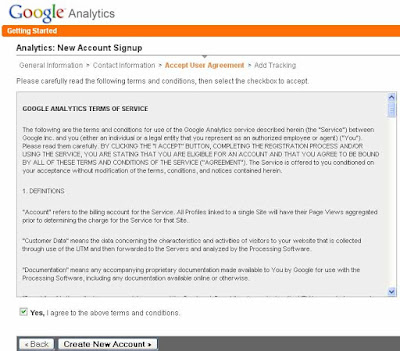
Step 5: Read and Accept the Term & Conditions.
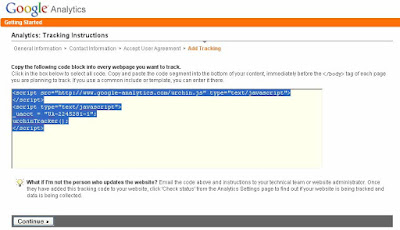
Step 6: Select and copy all the code in the box below. This wil be used to be entered into your Blogger Layout(or Template)
Google Analytics shows you how people found your site, how they explored it, and how you can enhance their visitor experience. More detailed explanation can be found here.
Google Analytics Installation Guide:
Detailed installation can be found here, but I've compiled a easy summary for you to do -With PICTURES!
Step 1: Go to http://www.google.com/analytics and log in with your Google Account. Don't have one? Just go and register. If you have a GMail or 'new' Blogger account, just use that one to sign in.

Step 2: Click the Sign Up button.

Step 3: Enter your website details.

Step 4: Fill in the form. Again.

Step 5: Read and Accept the Term & Conditions.

Step 6: Select and copy all the code in the box below. This wil be used to be entered into your Blogger Layout(or Template)

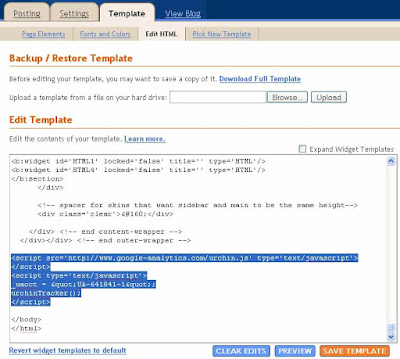
Step 7: In your Blogger Dashboard, Got to Layout>Edit HTML. In the Edit HTML box, go down to the very bottom. You see something similar to the one below. Just paste the code you just copied before (in Step 6) above the tag < / body >.

Step 8: Just wait for the reports to come in. In the mean time, explore the Analytics page to familiarize yourself. Good Luck!
Thursday, May 17, 2007
Tip: Get SMS Reminder with Google Calendar
If you used Google Calendar before and didn't know what else to do with it - apart from. Here's a short tip on how to get SMS reminder of every event you put.
Step 1: Log in to Google Calendar. If you haven't had an account yet, register one now here.
Step 2: Click the 'Settings' link on the top right corner and then click at the 'Mobile Setup'.
Step 3: Enter your cellular details in the from provided. Choose your country and fill in your mobile number. [Note: Only certain carriers are supported by this. Click on 'What carriers are supported?' Last I check, only DSTCom are supported. So b.mobile users are out of luck.]
Step 4: Click the 'Send Verification Code' button and wait for the SMS containing the verification code to arrive on your celliie.
Step 5: Once you get the verification code, fill it in and click 'Finish' and you're done.
Step 6: Click 'Save'.
Step 7: Create an event and under the 'Options' tab, set the Reminder to SMS and choose how many minutes you want the SMS to arrive from the time of the event.
 Step 2
 Step 3 to Step 6
 Step 7
 Sample message from Google in my phone.
Step 1: Log in to Google Calendar. If you haven't had an account yet, register one now here.
Step 2: Click the 'Settings' link on the top right corner and then click at the 'Mobile Setup'.
Step 3: Enter your cellular details in the from provided. Choose your country and fill in your mobile number. [Note: Only certain carriers are supported by this. Click on 'What carriers are supported?' Last I check, only DSTCom are supported. So b.mobile users are out of luck.]
Step 4: Click the 'Send Verification Code' button and wait for the SMS containing the verification code to arrive on your celliie.
Step 5: Once you get the verification code, fill it in and click 'Finish' and you're done.
Step 6: Click 'Save'.
Step 7: Create an event and under the 'Options' tab, set the Reminder to SMS and choose how many minutes you want the SMS to arrive from the time of the event.
 Step 2
 Step 3 to Step 6
 Step 7
 Sample message from Google in my phone.
Tuesday, May 08, 2007
09-f9-11-02-9d-74-e3-5b-d8-41-56-c5-63-56-88-c0
May 1st 2007.
Those 16 pair of number/letters had recently made huge impact on Digg.com, the popular user contributed news site founded by former Tech TV guy, Kevin Rose. So what happened. Well, the codes (the numbers/letters) 09-f9-11-02-9d-74-e3-5b-d8-41-56-c5-63-56-88-c0 got posted as a story on Digg and gets promoted to the home page. Its the code that allows you to crack HD-DVD's Digital Rights Management. Digg doesn't want to get sued. Digg take down the post. User post again. User got banned. Other users started to post it again and all hell break loose. Posts containing that code gets dugg in no time.
Reports from CrankyGeeks:
Digg Users Revolt by BunnieLebowsky
'Digg the code' music video from GeekBrief:
Listen to 'This Week in Tech' netcast: Download it here.
And finally, Kevin's blog post here.
Those 16 pair of number/letters had recently made huge impact on Digg.com, the popular user contributed news site founded by former Tech TV guy, Kevin Rose. So what happened. Well, the codes (the numbers/letters) 09-f9-11-02-9d-74-e3-5b-d8-41-56-c5-63-56-88-c0 got posted as a story on Digg and gets promoted to the home page. Its the code that allows you to crack HD-DVD's Digital Rights Management. Digg doesn't want to get sued. Digg take down the post. User post again. User got banned. Other users started to post it again and all hell break loose. Posts containing that code gets dugg in no time.
Reports from CrankyGeeks:
Digg Users Revolt by BunnieLebowsky
'Digg the code' music video from GeekBrief:
Listen to 'This Week in Tech' netcast: Download it here.
And finally, Kevin's blog post here.
Monday, March 05, 2007
Why You Should Be A Pirate
You wouldn't steal a car
You wouldn't steal a handbag
You wouldn't steal a TV
You wouldn't steal a Movie
Piracy is stealing.
You wouldn't steal a TV
You wouldn't steal a Movie
Piracy is stealing.

Another reason to be a pirate?
Keira Knightly!

Or just hang around with these kind of pirates. Arggg!

Monday, February 26, 2007
Tuesday, February 20, 2007
Make Digital Edition
More on Make Magazine, you can subscribe to both the Digital Edition as well as the Print Edition. So...what is Make Digital Edition?
What is MAKE - Digital Edition?
- How do I add digital editions to my subscription?
- Do I pay more for digital access?
- Can I get just the digital edition?
- What technology do you use for digital editions?
- What am I entitled to view and search?
- Can I share MAKE - Digital Edition with Friends?
- Can I print out articles from MAKE - Digital Edition?
- And more.... Link.
Friday, December 16, 2005
Official: Access gmail from your mobile..!!
Good news for gmail user! You now can access gmail directly from your mobile phone. Yeah i know there have been other althernatives.. but now its official from google..!
Note: GPRS connection required!
read more | digg story
Note: GPRS connection required!
read more | digg story
Monday, November 21, 2005
15 Common Mistakes by Google Adsense Publishers ....
... that Violate Terms of Service - Google Adsense great resources.
Google Adsense program is a popular web advertising program which provides a good income source for many websites. There are well defined terms of service to strictly adhere to when participating in the program.
On my visit through sites and forums, I daily notice several instances of misuse of Adsense ads. Believe me, if I can see it in a 5 seconds gaze! - so can the Adsense guys. And if they do, you are on your way off the program. So here a few helpful Google Adsense tips, probably many you already know, and few you might gain by knowing now. These adsense faq are all picked from the Program Policies, Terms and Conditions and FAQ itself and presented in a simplified manner.
1. Never click your own adsense ads or get them clicked for whatever reason. You know this one very well. This is a surefire way to close you Adsense account. Never tell your office associates or friends to click on them. Keep a check if your family or children are busy increasing your income by clicking your ads and indirectly trying to stop your income. Dont even think of offering incentives for clicks, using automated clicking tools, or other deceptive software. Adsense is very smart to detect fraudulent clicks. Check the ads which appear on your pages by the Google Preview tool if required.
Read More
Google Adsense program is a popular web advertising program which provides a good income source for many websites. There are well defined terms of service to strictly adhere to when participating in the program.
On my visit through sites and forums, I daily notice several instances of misuse of Adsense ads. Believe me, if I can see it in a 5 seconds gaze! - so can the Adsense guys. And if they do, you are on your way off the program. So here a few helpful Google Adsense tips, probably many you already know, and few you might gain by knowing now. These adsense faq are all picked from the Program Policies, Terms and Conditions and FAQ itself and presented in a simplified manner.
1. Never click your own adsense ads or get them clicked for whatever reason. You know this one very well. This is a surefire way to close you Adsense account. Never tell your office associates or friends to click on them. Keep a check if your family or children are busy increasing your income by clicking your ads and indirectly trying to stop your income. Dont even think of offering incentives for clicks, using automated clicking tools, or other deceptive software. Adsense is very smart to detect fraudulent clicks. Check the ads which appear on your pages by the Google Preview tool if required.
Read More
Wednesday, November 16, 2005
Brunei News Website Hacked (Borneo Bulletin)
Bandar Seri Begawan - One of Brunei Darussalam's private and popular news web sites, brudirect.com, went off the Internet for a few hours yesterday as some cyber crooks hacked into the portal and posted an obscene message.
People who tried to access the web site were directed to a web page with messages carrying profanity the hackers had set up.
Calling themselves "Noizebox" and a crew of four naming themselves "fishstiqz", "bytemonk", "d10r" and "n00v", these hackers claimed that they could `juggle assembly of different architecture" (security programs).
Monday, November 14, 2005
Capital FM now with Podcast
It seems radio shows nowadays take podcasting seriously. Capital FM now offers podcast download on their website. Now there's no more missing your favourite shows. Click here to go straight to their website.
If you're a n00b with podcast and podcasting, below are links that you might find useful:
Wikipedia - Podcast
iTunes Music Store (you have to download iTunes first)
AOL Music
My favourite podcasts:
Diggnation
This Week In Tech
Security Now! with Steve Gibson
Techphile
infected
... and lots more!
If you're a n00b with podcast and podcasting, below are links that you might find useful:
Wikipedia - Podcast
iTunes Music Store (you have to download iTunes first)
AOL Music
My favourite podcasts:
Diggnation
This Week In Tech
Security Now! with Steve Gibson
Techphile
infected
... and lots more!
Wednesday, November 09, 2005
The blogs This Week...
Okay, this is probably lame but I've decided to add a bit of flavor here. Every week I'll add links and stuff that I find interesting that you might like. So, without further adieu, here there are:
Lip-sync to da max. It's all the rage these days...
Family Guy's gretest moments
Lip-sync to da max. It's all the rage these days...
Family Guy's gretest moments
Thursday, October 13, 2005
Using Google to download free Movies
Some days ago i told you how to use the google search to find Mp3 files and Ebooks. Today I will describe how to use similar searches to find movies using google searches.
read more | digg story
read more | digg story
Saturday, August 27, 2005
500+ Bit-torrent Sites
Tons of bittorrents sites listed to you lucky people with high bandwith.
This page has links to over 500 other websites containing torrents and other clients. They are even put together in similar genres (TV, Music, Movies, Anime, etc.). A must see for Bit-torrent newbies and veterans.
read more | digg story
This page has links to over 500 other websites containing torrents and other clients. They are even put together in similar genres (TV, Music, Movies, Anime, etc.). A must see for Bit-torrent newbies and veterans.
read more | digg story
Sunday, May 15, 2005
Use your mobile phone with Skype
Just found this in my RSS reader. It will be cool to use your bluetooth enabled phone and pair it with Skype. Headsets not required.
Skype for Symbian Based Phones (sorta) 
[via MAKE: Blog]
Subscribe to:
Posts (Atom)


 Posts
Posts


